
Usability and User Experience Assessment of a Connected Wake-up Light
About the Project
The project focused on improving the usability and user experience of the Somneo, a wake-up light. The final (re-)design includes micro-animations for feedback, the introduction of presets and the reduction of possible false triggers.
The various concepts generated through brainstorming were tested out through paper prototypes and the decided redesign was created using Figma. The project was carried out as part of the Usability and User Experience Assessment in Design course at TU Delft as a group of 4.
My Role
All of the students that were part of the group involved were keen on doing their best even from the get-go. This lead to a well-balanced group where each of us undertook almost all aspects of the design process. The parts of the design process that I took charge of were the data analysis and the storyboarding. That said and like mentioned above, like the others, I also created the paper prototypes, conducted interviews and took an active and equal role in creating the final prototype.
This Project Demonstrates...
-
In-depth analysis of the product and its functions
-
Heuristic evaluation through a cognitive jog through
-
Efficient remote collaboration and design on Figma (Using components)
-
Paper prototyping (Remote & in-person)
-
Use of both qualitative and quantitative methods for usability and user experience assessment
The Process
This project started off before the COVID-19 pandemic and hence a lot of the initial activities were in person. However as the situation progressed, the team resorted to moving the process online. We had established even before the project started that while we would like to do the best we can, we would always be compassionate and understanding of each others' difficulties. This sort of an approach towards the project resulted in one of the most effective projects I have worked on both in terms of the result but also in terms of learnings from the project. Personally, I really enjoyed the combination of creativity and disciplined application of design methods during the project. The project ran a course of 20 weeks with the team working 14 hours per week.
Due to the larger number of methods employed, within each section, I elaborate on the 'Why?' behind the sub-steps taken. This way of presenting the project is adopted to keep the presentation of the process short and clear while trying to convey how the steps contributed to the design process.
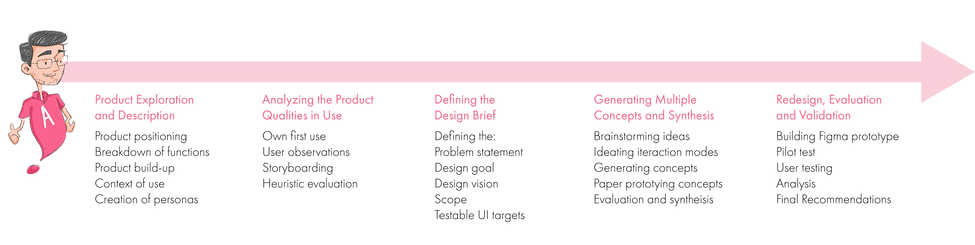
Below is an outline of the process adopted for the project.
Product Exploration and Description
The Philips Somneo Sleep & Wake-up Light is a device designed to help users fall asleep relaxed and wake up refreshed. The product’s unique light gradually changes in warmth and intensity, simulating the sunset and the sunrise, thus helping regulate the users’ circadian rhythm.
For the purpose of this project, we were provided with model HF3670 of the Somneo. Products in the HF367X series offer extra functionalities compared to other Sleep and Wake-up Lights, including connectivity with the SleepMapper app, which allows for further customisation of functions and tracks sleep hours and environmental data gathered from the bedroom.
The video below by Philips shows a glimpse into the product and its value proposition.
The project started with outlining the 'description' of the product.
The steps taken and the 'Why?' behind each step:
-
Product positioning: To understand where the product fits in the company's portfolio as well as how it compared to other products in the market.
-
Breakdown of functions and purpose: To understand the main functions of the product and how these functions are presented in the user interface of the product.
-
Product Build-up: To breakdown what constitutes the product. This shed light on how the functions were accessed and where they fit in the hierarchy.
-
Context of Use: To present and reflect on what are the other devices, factors and people that the product influences and are influenced by the product.
-
Defining Personas: To define who the product is for in order to determine what aspects need to be paid attention to.
The sections below present a visual overview of these steps.

Philips Smart Sleep Suite and products included in the Suite

Overview of Philips wake-up lights and other similar products

A visualization of Philips Somneo’s functionalities
Functions that are displayed in blue are only accessible through the SleepMapper app, while those that are displayed in red are only accessible through the device.


Physical Build-up of the Somneo


Digital Build-up of the Somneo (Click on the navigation arrow to see other breakdowns as well)

Context of use and factors that influence the use of the Somneo


Several personas developed (Click on the navigation arrows to view other personas)
Analyzing the Product Qualities in Use
After understanding the product, the next step was to analyse the product qualities in use.
The steps taken and the 'Why?' behind each step:
-
Own first use: To anticipate and get a first-hand understanding of the usage of the product in context. One of the team members took the Somneo home to use it for the night.
-
User observations: To objectively take note of how users (2 participants that were accessible; university students) navigate and perceive the various functions of the Somneo.
-
Storyboarding: To reflect on how users might interact with the product and what might be the problems they might encounter.
-
Cognitive Jog through: To look at how a prospective user would act to reach a particular goal. This method focuses predominantly on usability in terms of task completion.
The sections below present a visual overview of these steps.


Own first use
User Observations (Click the navigation arrow and click on the image to zoom in and view results)


Implementation of the Cognitive Jogthrough
Storyboards (Click on the navigation arrow to see other storyboards)
Defining the Design Brief
After analyzing the product and its qualities in use, the results were collated following which a design brief was formulated. This brief is shown below.
Problem statement:
-
The interface is cluttered with functions and lacks consistency. Actions are unintuitive, making users feel overwhelmed. Primary functions are overshadowed by a multitude of unclear affordances and a multi-layered interface in which users easily get lost.
-
New users have to put in a considerable amount of effort to familiarise themselves with using the product. Multiple icons are unclear, and packed together in a cramped display with a small touch area. Users are taken back to the home menu after just 8 seconds, adding to a rushed experience that does not allow for easy use nor the exploration of all of the available functions.
-
The complexity of the interface is further increased by the unclear relation between the device and the SleepMapper app. Some primary functions are only available in the app, which is not clearly stated on the packaging, device nor manual. This makes for the device to hardly function as a stand-alone product.
-
Lastly, the Somneo takes a passive stance regarding its health-related benefits. The device offers users a variety of data about users’ sleep environment without offering support to actually improve sleep, nor get a valuable overview of this data.
"The interaction with the Somneo should seamlessly fit into the user’s bedroom routine. Users should be able to confidently use the functions of the Somneo through a consistent interface, completing tasks effortlessly.
We want users to feel supported by the device at improving their sleep and wake-up quality."
Scope:
-
Redesign the Somneo with a greater focus on the interaction with the physical device.
-
Tackle usability issues related to the digital user interface of the product. This will include issues caused by the positioning of the interactive areas.
-
Look into the appropriate distribution of functions between the app and the device, primarily to allow the Somneo to also function as a stand-alone device.
-
The interface of the SleepMapper app will not be a main focus within the scope of this project. However, functionalities might be added or taken out of the app to ensure the right support for the user, to make a clear distinction between the Somneo device and the app.
Concept Generation and Synthesis
The steps taken and the 'Why?' behind each step:
-
Brainstorming ideas: To rapidly generate ideas about what the redesign could be.
-
Ideating interaction modes: To think of the nature and 'character' of the interaction.
-
Generating concepts: To test the efficacy of several ideas and to get insights about what the final concept could be.
-
Prototyping concepts: Low fidelity prototyping to quickly test the generated concepts. Two were paper prototypes and one was on Figma. The Figma prototype was made with the intention of exploring the tool and to also understand the interactivity that would be possible which could potentially prove to be useful for creating the final concept prototype.
-
Evaluation and synthesis: Evaluation of the results of the prototyping to lead to the final concept.
The sections below present a visual overview of these steps.

Brainstorming ideas

Ideating the potential interaction characteristics

Sketching interfaces


Concepts 1, 2 and 3 in order (Click on the navigation arrows to view the other concepts)
 |  |  |
|---|
Low-fidelity prototyping


Synthesized concept (Click on the navigation arrow to view the 'how?' behind the synthesis)
Redesign, Evaluation and Validation
The steps taken and the 'Why?' behind each step:
-
Building Figma prototype: Figma proved to be an appropriate tool to convey the interaction experience. The team used this opportunity to get used to remote collaboration over Figma and the use of a component-based design system.
-
Pilot test: Before testing with users, the prototype was tested remotely with expert participants (i.e., the project mentors). This was to ensure that our setup is clear and provides us with relevant data.
-
User testing: User testing was carried out in person to validate the final concept. Consistency was ensured by developing a template based on which all of the teammates who were testing made the housing for the phone. The phone would have the interactive component of the prototype.
-
Analysis: Both quantitative and qualitative means were used to analyze the data collected from prototyping for validation.
-
Further recommendations: These recommendations were based on testing the final design prototype and were intended to further improve and refine the developed design. The team wanted to present the most thorough design possible in the given time frame.
The sections below present a visual overview of these steps.

Figma for prototyping


Demonstration of a few of the interactions of the main functions developed using Figma
(Click on the navigation arrows to view other functions)

The guide made to facilitate remote testing with the pilot test participants

The remote pilot test conducted over Zoom

The Structure of the prototype
 |  |  |
|---|
Physical prototyping

AttrakDiff scale: The ratings refer to the participant’s overall experience with the redesign

PrEmo analysis: The ratings refer to the participant’s overall experience with the redesign


Examples to illustrate the nature of incremental improvements to the final redesign (Click the navigation arrows to view other improvements)
Final thoughts...
The project proved to me a tremendous learning experience for me. I really enjoyed the process followed where creative input shined as we rigorously followed the methodology. The project hence is one of the most memorable I have worked on.
I thoroughly enjoyed data analysis and testing the insights through prototyping. Working with Figma for prototyping was ideal as everyone could provide input on the Figma prototype. Using components and having design systems prepared were steps that were taken which greatly improved workflow. Since I enjoy sketching and storytelling, employing those skills to create well defined potential scenarios proved to be of great value as well.